

How to fund a crypto wallet with a card: step-by-step instructions
How to fund a crypto wallet with a card — a quick solution for purchasing cryptocurrency with fiat using a bank card. This article outlines practical steps, common risks and checks to make sure the operation goes safely and correctly.
Brief (TL;DR):
- Sign up on a reputable platform or open the card gateway interface in your wallet; complete KYC if required.
- Add a card with 3‑D Secure, choose the currency and network, and perform a small test purchase.
- Check the transaction by its identifier (TxID), the wallet balance, and the receipt from the platform.
- Main security: do not send tokens to an address that doesn’t match the network; keep payment confirmations.
- If in doubt — contact the platform’s support or your bank first.
Key points:
- Use a card that supports 3‑D Secure to reduce the chance of blocks and chargebacks.
- Verify that the platform supports Ukrainian cards and the hryvnia; clarify the conversion rate.
- Pre-test: buy a small amount (equivalent of $10–30) before a large operation.
- Avoid sending to addresses on unknown networks — this is the most common cause of lost funds.
- Keep screenshots of receipts and the TxID for dispute resolution or tax reporting.
What to prepare before you start
Before paying with a card, prepare documents, devices and information to avoid interruptions and risks.
Bank support:
- Check with your bank about its policy on crypto-related payments and possible limits or blocks.
- Verify the possibility of international transactions and whether additional confirmations are required.
Device security:
- Update your operating system and browser; avoid public Wi‑Fi or use a reliable VPN.
- Enable two-factor authentication (2FA) for your platform account.
What you will need
In short — documents, a card, a wallet and basic technical preparation.
Card and limits:
- A Visa or Mastercard bank card capable of online payments and 3‑D Secure.
Documents for KYC:
- Passport/ID, sometimes a photo, proof of address — prepare scans or photos.
Wallet:
- The receiving address for cryptocurrency (if you withdraw from an exchange to your non‑custodial wallet) — copy it before the transaction.
Technical knowledge:
- Understanding the difference between networks (for example, Ethereum ERC‑20 and Binance Smart Chain BEP‑20) and address formats.
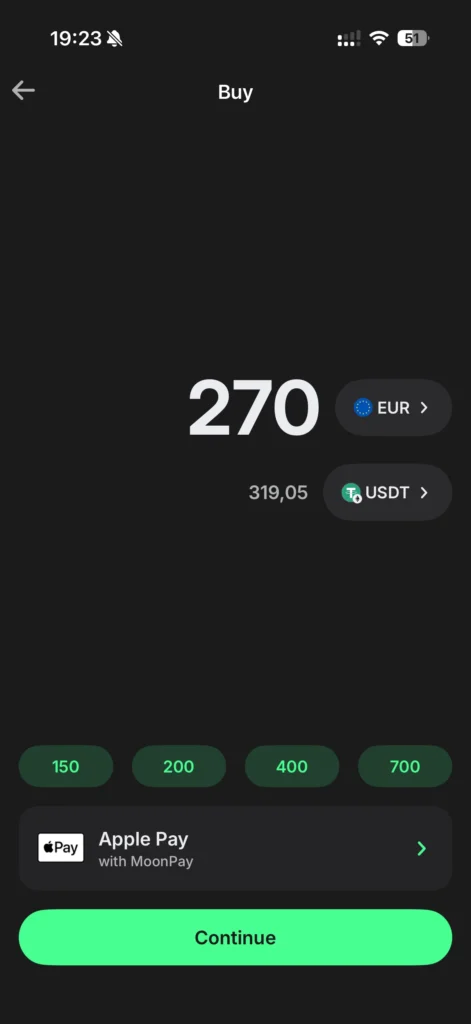
Step-by-step: how to fund a crypto wallet with a card
Below is a detailed sequential algorithm for buying cryptocurrency with a card through an exchange or payment gateway. Each step starts with a verb and includes a practical tip or warning.
- Choose a service.
Explanation: Select a well-known exchange, aggregator or card gateway that works with Ukraine. Tip: check reputation and reviews. - Register an account.
Explanation: Create an account with a strong password and enable 2FA. Warning: do not use simple passwords. - Complete identification (KYC).
Explanation: Upload documents and follow the platform’s instructions. Check: make sure document photos are legible. - Add a card to your profile.
Explanation: Enter your card details; the platform may initiate an authorization for a small amount. Check: the card must support 3‑D Secure. - Select the amount and currency to buy.
Explanation: Enter the fiat amount or the crypto amount; choose a stablecoin if you want to reduce volatility. Tip: review the pre-trade rate and spread. - Choose the network and recipient address.
Explanation: Enter your wallet address and select the network — for example ERC‑20 or BEP‑20. Check: ensure the address and network are compatible; an error can lead to loss of funds. - Perform a test payment.
Explanation: Send a small amount (equivalent of $10–30) to verify the route and crediting. Tip: if the test succeeds, proceed with the main amount. - Confirm the payment and save receipts.
Explanation: Take screenshots of the receipt, save the TxID and the card charge confirmation. Warning: saved data will help in disputes or for taxes. - Monitor the transaction status.
Explanation: Check the internal status on the platform and confirmations on the blockchain via the TxID. Tip: if the transaction is delayed beyond the stated time — contact support. - Withdraw funds to your non‑custodial wallet (if needed).
Explanation: If you bought on an exchange, withdraw to a hardware or software wallet. Check: the withdrawal address must match exactly. - Archive documents for accounting.
Explanation: Keep receipts and screenshots for bookkeeping or tax returns. Tip: organize files by date and amount. - Check the final balance and log out.
Explanation: Confirm that funds have been credited and log out of the account on a public device. Warning: do not leave account credentials saved on someone else’s device.
Fees, time and limits
Card payments involve multiple levels of costs and restrictions.
Fees:
- Fees from the payment provider (aggregator), exchange/exchanger fees and network fees for withdrawals. Check the total amount before confirming.
Time:
- Card → exchange: usually instant or a few minutes; blockchain withdrawals depend on the network (from minutes to hours).
Limits:
- KYC tiers determine daily/monthly limits; without verification — limits are often very restrictive.
Common problems and how to solve them
Below are frequent symptoms, likely causes and troubleshooting steps.
Symptom: Card payment declined.
- Likely cause: Bank blocked the operation or insufficient funds.
- How to fix: Contact the bank, enable 3‑D Secure or try a different card.
Symptom: Crypto did not appear in the wallet after payment.
- Likely cause: Processing by the payment provider or delayed withdrawal.
- How to fix: Get the TxID from the platform and check the status in a block explorer; contact support with the TxID.
Symptom: High rate from the platform.
- Likely cause: The service adds a spread or uses an unfavorable exchange rate.
- How to fix: Compare rates from several services; for large amounts consider OTC.
Symptom: Wrong network on withdrawal (token not supported).
- Likely cause: The wrong network was selected (for example, sent ERC‑20 to a BEP‑20 address).
- How to fix: Contact the platform; if possible use recovery tools provided by the provider, otherwise funds may be lost.
Symptom: Bank initiated a chargeback.
- Likely cause: The user disputed the payment or bank policy.
- How to fix: Prepare documents and the platform’s contact details; provide proof of the transaction to the bank and the platform.
Symptom: Exchange account blocked.
- Likely cause: Suspicious activity or KYC mismatch.
- How to fix: Contact support, provide additional documents and wait for the review result.
Common mistakes and how to avoid them
Below — typical mistakes and concrete fixes.
1) Sending to an address on a different network.
- Fix: Check the network before copying the address; do a test transfer.
2) Using an unfamiliar exchanger with low reputation.
- Fix: Choose platforms with verified reviews and history; check the domain and SSL.
3) Ignoring 3‑D Secure.
- Fix: Use cards with 3‑D Secure; it reduces the risk of declines and chargebacks.
4) Not saving receipts and TxIDs.
- Fix: Always save screenshots, emails and the TxID immediately after payment.
5) Buying a large amount without a test.
- Fix: First do a small transaction, then the main amount.
6) Keeping access on public devices.
- Fix: Always log out, do not save passwords on other people’s computers.
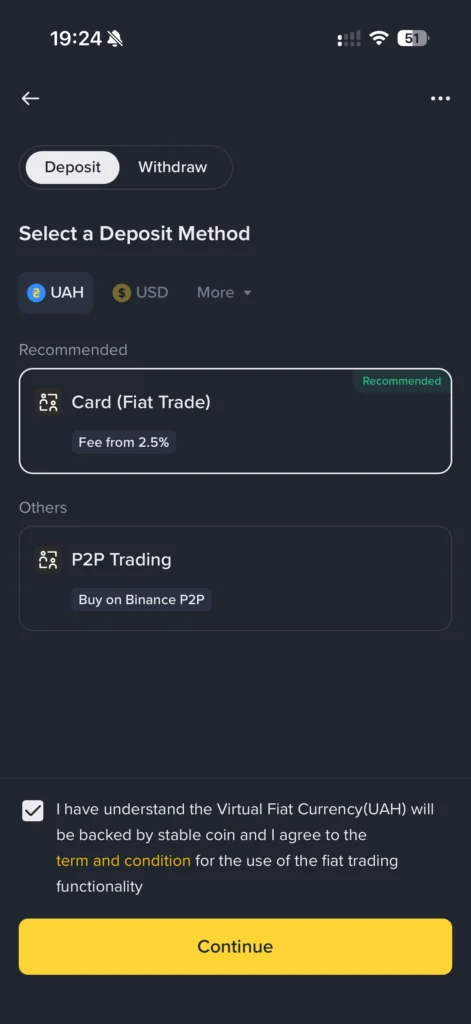
Alternatives: when which option is better
A short comparison and recommendations depending on your needs.
If you are a beginner…
– Choose large exchanges with an intuitive interface and card support, where 24/7 help is available.
If security is important…
– Use a non‑custodial wallet and withdraw purchased crypto to a hardware wallet.
If you need speed…
– Card gateways and instant exchangers provide the fastest crediting, but are often more expensive.
Caveat/nuance:
– For large amounts, card payments are often inefficient because of low limits, high fees and chargeback risk — consider bank transfer or OTC deals for those cases. This method is convenient for quick and small payments, but not always optimal for large investments.
Key terms
Short definitions of key terms for quick orientation.
- KYC (know‑your‑customer) — The client verification process: platforms require documents to confirm identity and prevent money laundering.
- 3‑D Secure — An additional card verification protocol (for example, “Verified by Visa”) that increases the security of online payments.
- On‑ramp — A mechanism for converting fiat currency to cryptocurrency (card payment, bank transfer, exchanger).
- Custodial wallet — A service that holds private keys on behalf of the user (for example, exchanges). Users entrust custody of funds to the provider.
- Non‑custodial wallet — A wallet where the user controls the private keys; more control but more responsibility for security.
- TxID (Transaction ID) — A unique identifier of a blockchain transaction that can be used to track the movement of funds in a block explorer.
- Spread — The difference between buy/sell prices set by the service; a hidden form of fee.
- Chargeback — A dispute of a card transaction by the cardholder through the bank; can create problems for the seller or exchange.
FAQ
What is the average time for crediting when paying by card?
When paying by card, crediting on an exchange usually happens instantly or within a few minutes; blockchain withdrawals depend on the network and can take from a few minutes to hours.
What to do if I accidentally sent tokens to the wrong network?
If the service/wallet supports cross-chain recovery — contact their support with proof. Otherwise funds are generally irreversible.
Is it safe to buy crypto with a card in Ukraine?
It is safe if you use trusted services, 3‑D Secure and follow security measures. Check your bank’s policy on crypto transactions before operating.
Can I avoid spreads when buying with a card?
Partially: compare rates of different services or use OTC for large amounts; fully avoiding spreads with card purchases is difficult.
What is a test transaction and why do it?
It’s a small operation to verify the route and network; it lets you confirm that the address and network are correct before sending a larger amount.
Where to turn if the payment was debited but crypto was not received?
Gather payment evidence (screenshots, bank receipt, TxID) and contact the platform’s support; if needed, contact your bank.
Short summary
Funding a crypto wallet with a card is a fast and convenient way to buy cryptocurrency, but requires attention to platform choice, network verification and keeping confirmations. Before a large purchase do a test transaction, make sure the address and network are compatible and save the TxID and receipts. If problems occur act methodically: obtain proof of payment, check in a block explorer and contact platform support or your bank. Following basic security and verification rules minimizes risks and ensures correct crediting of funds.