
Short answer: As a resident of Ukraine, you can apply for a Bybit Card directly in Ukraine in 2026. You will receive a virtual Bybit Card. The process is simple both for new users and for those who already have a Bybit account.
Is Bybit Card Available in Ukraine Right Now?
It is important to understand the different aspects of Bybit services:
- Bybit Exchange Account — available to Ukrainian residents. Ukraine is not included in Bybit’s list of restricted jurisdictions (only occupied territories such as Crimea, Donetsk, Luhansk, and Sevastopol are restricted). You can register, trade, and store cryptocurrency.
- Bank Card Deposits — also available. Ukrainian users can link their Monobank, PrivatBank, or other bank cards to purchase cryptocurrency with UAH in just a few clicks.
- Official Bybit Card (Mastercard Crypto Card) — the virtual Bybit Card is available. This is a separate product: a Mastercard debit card connected to your crypto balance that automatically converts cryptocurrency into fiat currency at the time of payment. The card is issued by a licensed Mastercard issuing partner.
According to official Bybit information, the card is available in many countries across Europe and beyond. For example, Bybit Card in Moldova is also available. Card availability and supported currencies depend on the country where you completed your KYC verification (Know Your Customer). For example, the available Bybit Card currency in Ukraine is USD.
How to Get a Bybit Card in Ukraine
Step 1. Create a Bybit Account
To order a Bybit Card in Ukraine, you first need to register an account on Bybit.
To register, you will need:
- an email address or mobile phone number;
- a strong password;
- a verification code sent via SMS or email.
After registration, it is recommended to enable Two-Factor Authentication (2FA) immediately. This helps protect your account from unauthorized access and improves the security of your funds.
Step 2. Open the Bybit Card Section
After completing verification, log in to the Bybit mobile app or web platform.
Find the Bybit Card section in the main menu or among Bybit’s products. Depending on the app version, the location may vary slightly, but it is usually accessible directly from the homepage.
Open the card page and click the application button.
Step 3. Complete Identity Verification (KYC)
Bybit Card is only available to users who have completed identity verification.
The following documents are typically accepted:
- international passport;
- national ID card;
- other documents supported by the Bybit verification system.
To complete KYC:
- Upload your identity document.
- Take a selfie or record a short verification video.
- Submit the information for review.
Verification usually takes anywhere from a few minutes to several hours. Once approved, you will gain access to Bybit Card and other financial products.
Step 4. Submit Your Card Application
Before submitting your application, review the personal information displayed in your profile.
If everything is correct:
- Confirm card issuance.
- Wait for the application review.
- Receive access to your virtual Bybit Card.
Once approved, the card will automatically appear in your account and be ready for use.
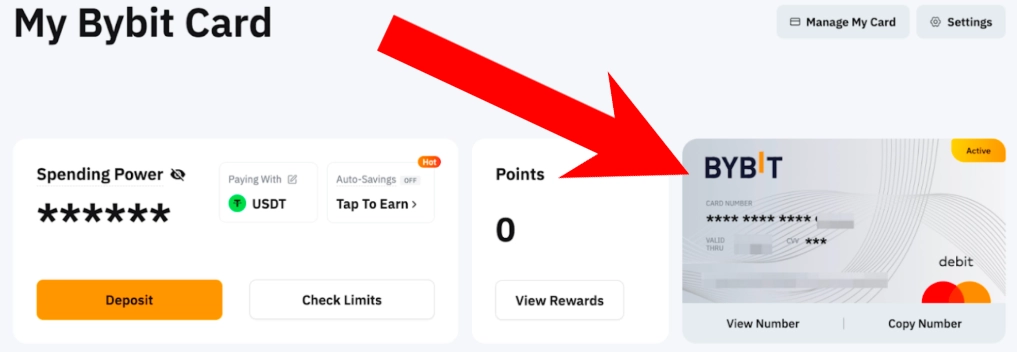
You will be able to view:
- card number;
- expiration date;
- CVV code;
- online payment details.
Step 5. Add Bybit Card to Apple Pay or Google Pay
If you plan to pay in Ukrainian stores using your smartphone, it is recommended to connect the card to a digital wallet right away.
To do this:
- Open the Bybit Card section.
- Click Add to Wallet.
- Select Apple Pay or Google Pay.
- Confirm the card addition.
After activation, you can make NFC payments just like with any regular Mastercard bank card.
Step 6. Fund Your Card Balance
Before making your first payment, you need to fund your Bybit account.
The most common methods are:
- transferring USDT from another crypto wallet;
- buying cryptocurrency with a bank card;
- P2P cryptocurrency trading on Bybit;
- internal transfers between Bybit accounts.
If this is your first Bybit Card, it is recommended to start with a small amount. For example, deposit 20-50 USDT and test the card with a small purchase.
Step 7. Make Your First Purchase
After funding your balance, you can test the card with a small transaction.
Good options for a first purchase include:
- coffee or a drink at a café;
- groceries from a supermarket;
- an online service subscription;
- a small order from an online store.
After payment, open the transaction history in the Bybit app and review the payment details.
Pay attention to:
- the charged amount;
- the crypto conversion rate;
- cashback rewards received;
- participation in Bybit bonus programs.
If the payment is successful, your card is ready for everyday online and offline purchases in Ukraine and abroad.
Apply for Bybit Card in Ukraine
Who Else Can Get a Bybit Card: Ukrainians Living in the EU
If you are a Ukrainian citizen living in an EEA country (Poland, Germany, Czech Republic, or other EU countries) and can verify your residential address, you may apply for both the virtual and physical Bybit Card.
Requirements:
- A Bybit account with advanced identity verification completed in an EEA country.
- Proof of address in the EEA (utility bill, bank statement, etc.).
- A valid identity document (passport or national ID).
After approval, the card is issued in both virtual and physical formats, can be added to Apple Pay and Google Pay, offers up to 10% cashback, and works anywhere Mastercard is accepted.
Apply for Bybit Card (EEA Residents)
New user bonus: apply for the card through the link and receive up to a 120 EUR welcome bonus. Check the official Bybit website for current promotion details, as terms may change.
Bybit Card Fees, Limits, and Payments
| Parameter | Value |
|---|---|
| Virtual Card Issuance | Free |
| Crypto-to-Fiat Conversion | From 0.9% |
| Double Conversion Fee | Up to 2% |
| ATM Cash Withdrawal | 2% after the first 100 EUR per month |
| Cashback | Up to 10% |
| Apple Pay / Google Pay | Supported |
| Supported Assets | BTC, ETH, USDT, USDC, and others |
| Card Application Review | Up to 7 business days |
Advantages and Disadvantages of Bybit Card
Advantages:
- Up to 10% cashback on purchases
- Free virtual card issuance
- Apple Pay and Google Pay support
- Automatic crypto-to-fiat conversion during payments
- Works wherever Mastercard is accepted
Disadvantages:
- Cash withdrawal fee after exceeding the free monthly limit
Frequently Asked Questions (FAQ)
Can I get a Bybit Card in Ukraine in 2026?
Yes. Ukrainian residents can apply for a virtual Bybit Card directly from Ukraine.
Does Bybit operate in Ukraine?
Yes. Ukraine is not on Bybit’s list of restricted jurisdictions. Users can register accounts, trade, store cryptocurrency, and purchase crypto with bank cards.
How can a Ukrainian living in the EU get a Bybit Card?
You need a Bybit account with advanced verification completed in an EEA country, proof of address, and a valid identity document. After approval, both virtual and physical cards are available.
What cashback does Bybit Card offer?
Up to 10%, depending on your account level and the current rewards program.
Can I add Bybit Card to Apple Pay and Google Pay?
Yes. Apple Pay and Google Pay are supported in eligible countries.
How much does a Bybit Card cost?
Virtual card issuance is free.
Last updated: June 2026. This website may earn compensation through referral links. This does not affect our assessment. We provide factual information about Bybit Card availability for Ukrainian residents.

Comments