
When an exchange asks you to choose a network for USDT, one rule matters most: the withdrawal network must match the deposit network selected by the recipient. If a wallet or exchange service gives you a USDT TRC20 address, choose TRON (TRC20) when making the withdrawal. Do not switch to Ethereum (ERC20) or BNB Smart Chain (BEP20) simply because the fee looks lower.
TRC20 is commonly used for transfers between exchanges, wallets, and exchange services when both sides support TRON. ERC20 is the relevant option when the USDT must arrive in the Ethereum ecosystem. BEP20 is used on BNB Smart Chain, but you should confirm that the receiving service supports both the network and the specific token contract before sending funds.
One letter in the network name can matter more than the difference in fees.
Short answer: do not look for the “best USDT network” without considering the recipient’s deposit details. First, check which networks the recipient supports. Then compare the fee, crediting time, and minimum amount across the options supported by both sides.
What TRC20, ERC20, and BEP20 Mean
USDT is a stablecoin that exists on multiple blockchains. The asset uses the same ticker, but the transfer method depends on the network.
In its list of supported protocols, Tether identifies USDT as an ERC20 token on Ethereum and a TRC20 token on TRON. Tether also stresses that platforms should clearly tell users which protocols they support.
The network labels mean the following:
- TRC20 is the fungible-token standard on the TRON blockchain. According to TRON Developers, it is compatible with the ERC20 interface.
- ERC20 is the fungible-token standard on Ethereum. It defines common rules that allow tokens to interact with wallets, exchanges, and applications. The standard is documented on Ethereum.org.
- BEP20 is a token format used on BNB Smart Chain. An exchange or wallet may label a USDT transfer on this network as
BEP20,BSC, orBNB Smart Chain.
A balance of “100 USDT” may look identical in an app, but tokens on different networks are recorded on different blockchains. A regular transfer does not convert TRC20 to ERC20 or move ERC20 to BNB Smart Chain.
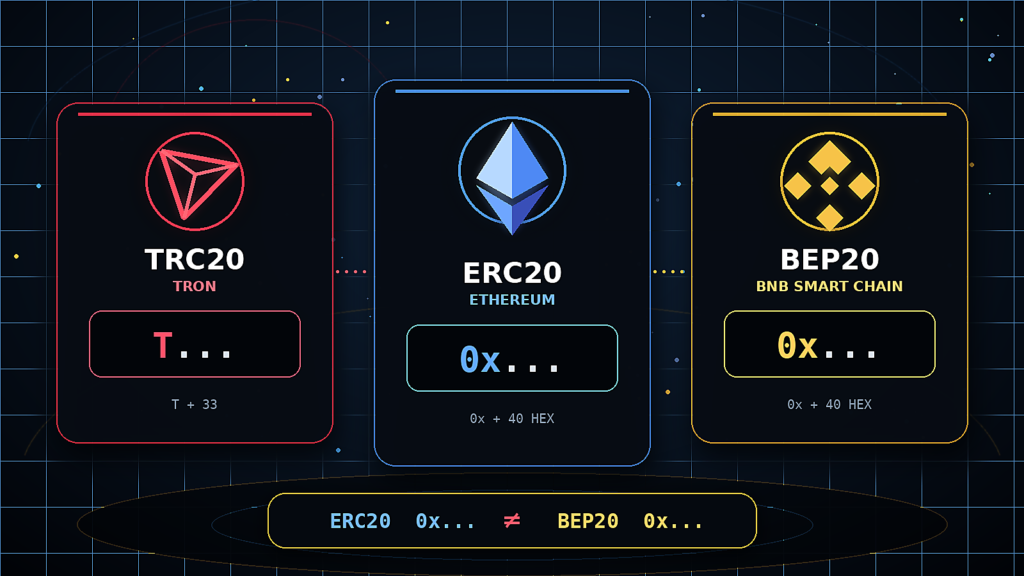
USDT TRC20 vs ERC20 vs BEP20
| Factor | USDT TRC20 | USDT ERC20 | USDT BEP20 |
|---|---|---|---|
| Blockchain | TRON | Ethereum | BNB Smart Chain |
| Labels you may see in an interface | TRON, TRC20 | Ethereum, ERC20 | BNB Smart Chain, BSC, BEP20 |
| Typical address format | Starts with T | Starts with 0x | Starts with 0x |
| Native asset used for network fees in a self-custody wallet | TRX | ETH | BNB |
| Transaction explorer | Tronscan | Etherscan | BscScan |
| When it makes sense | Transfers between services that support TRON | Using Ethereum wallets and applications | Using BNB Smart Chain and compatible applications |
| What to verify | Recipient support for TRC20 | ERC20 support and the displayed fee | BEP20 support and the correct token contract |
This table can narrow down the options, but it cannot replace a check in the recipient’s interface. An exchange may temporarily suspend deposits on a particular network. An exchange service may accept USDT TRC20 but not ERC20. A wallet may display the asset only after the correct network or token contract has been added.
What Is USDT TRC20?
USDT TRC20 is USDT transferred through the TRON blockchain under the TRC20 standard. Centralized exchanges, crypto wallets, and exchange services commonly support this network.
A TRON address usually begins with a capital T. This is a useful first check: if a service shows an address beginning with 0x..., it does not look like a standard TRON address. Still, the first character alone is not enough. The network name displayed beside the address or QR code is more important.
If USDT is held in a self-custody wallet, an outgoing transaction on TRON may require TRX or network resources. When USDT is withdrawn from an exchange, the exchange normally shows its withdrawal fee before confirmation and deducts it according to the platform’s rules.
That is why a statement such as “the USDT TRC20 fee is always a fixed amount” quickly becomes outdated. Check the figure on the final confirmation screen of the service you are using.
When to Choose TRC20
Choose TRC20 when both conditions are met:
- The recipient provided a USDT address on TRON or explicitly selected TRC20.
- The sending service supports USDT withdrawals through TRON.
If both sides also support other networks, compare the displayed fee and crediting conditions. Do not assume that TRC20 will be the cheapest option in every wallet or on every exchange.
What Is USDT ERC20?
USDT ERC20 is the version of the token used in the Ethereum ecosystem. Ethereum addresses begin with 0x, and a transaction sent from a self-custody wallet requires ETH to pay the network fee.
ERC20 is appropriate when the recipient accepts deposits specifically through Ethereum or when the USDT will be used in an application on that network. A wallet may support both Ethereum and BNB Smart Chain, for example, while keeping separate balances and transaction histories for each network.
The cost of an Ethereum transaction depends on current network demand and the operation itself. Exchanges also set their own withdrawal fees. Compare the amount shown immediately before confirmation rather than relying on an old article or screenshot.
When to Choose ERC20
Choose ERC20 when:
- the deposit address was generated for USDT on Ethereum;
- the recipient or required application does not support TRON or BNB Smart Chain;
- the USDT will be used on Ethereum after the transfer.
Sending a small amount through ERC20 can sometimes be disproportionately expensive. That does not justify changing the network on your own. If the fee is unsuitable, ask whether the recipient can provide a deposit address on another supported network.
What Is USDT BEP20?
USDT BEP20 is a common label for USDT available on BNB Smart Chain. A self-custody wallet will normally need BNB to pay the network fee. The address begins with 0x, just like an Ethereum address.
This similarity causes frequent mistakes. The same 0x... string can be a valid address on both Ethereum and BNB Smart Chain because both networks are compatible with the Ethereum Virtual Machine. The assets will still arrive on the network selected by the sender.
Before sending USDT through BEP20, check more than the address. Read the full network name on the deposit page and confirm that the receiving service credits USDT through BNB Smart Chain. If you need to add the token to a wallet manually, verify the contract through an official wallet, exchange, or block explorer source. The ticker USDT alone does not prove that you are looking at the correct token.
When to Choose BEP20
BEP20 is appropriate when the recipient explicitly supports USDT on BNB Smart Chain and the sender offers the same network. It is also used when USDT is needed in an application on BNB Smart Chain.
If the recipient’s page lists only Ethereum (ERC20), a similar-looking address is not permission to send the funds through BEP20.
Which Network Should You Choose for USDT?
The correct choice starts with the receiving side, not with a fee comparison table.
1. Open the Recipient’s Deposit Page
Select USDT and review the available networks. If you are paying an exchange service, use the payment details generated for that specific order. An address from an earlier order may have expired or may belong to a transaction with different conditions.
2. Find a Network Supported by Both Sides
Compare the recipient’s list with the networks offered by the sender. The names must match; a similar address format is not sufficient.
For example:
- the recipient displays
USDT — TRON (TRC20); - the sending exchange offers
TRON (TRC20); - that is the option you should select for the withdrawal.
3. Check the Fee, Minimum, and Amount to Be Credited
An exchange may display the amount deducted, the withdrawal fee, and the amount the recipient will receive as separate figures. An exchange order may require an exact payment amount. If the network or withdrawal fee reduces the delivered amount, an automated order may fail to recognize the payment without assistance from support.
4. Read the Warning Beside the Address
Services often state that only USDT on a specified network should be sent to the address. Treat this as an operational requirement. Check the asset, network, address, and any additional identifier requested by the platform.
5. Send a Test Transaction
Before sending a large amount, transfer a small portion first when the minimum limits and fees make a test practical. Wait for the deposit to appear, then send the remaining amount. A test transaction cannot fix an incorrect address, but it can limit the potential loss.
How to Transfer USDT TRC20 Safely
The sequence is similar across most exchanges and wallets, although button labels vary.
- Open the USDT deposit page on the receiving platform.
- Choose TRON (TRC20).
- Copy the address or scan its QR code.
- Select a USDT withdrawal on the sending platform.
- Paste the address and choose TRON (TRC20).
- Check the first and last characters of the address after pasting it.
- Review the fee, minimum amount, and final amount to be credited.
- Confirm the withdrawal and save the TXID, which identifies the transaction.
Never give anyone your seed phrase or private key so they can “check the transfer.” A public address or TXID is enough to view the transaction status. A legitimate support agent does not need your seed phrase either.
How to Check a USDT Transaction Using the TXID
A TXID, transaction hash, or transaction ID is the public identifier of a blockchain record. An exchange may not display it immediately. It normally appears after the platform has submitted the transaction to the network.
To check the transaction:
- Find the TXID in your withdrawal or transaction history.
- Open the relevant explorer: Tronscan for TRC20, Etherscan for ERC20, or BscScan for BEP20.
- Paste the TXID into the search field.
- Verify the status, sender, recipient, token, and amount.
- Check the number of confirmations if the receiving service specifies a requirement.
Read each status literally:
- Success / Confirmed means the network executed the transaction. If the service still does not show the deposit, check the address, token, and network, then contact its support team.
- Pending means the transaction has not reached final confirmation or the platform has not yet submitted it to the network. First establish whether a TXID already exists.
- Failed means the transaction did not complete the intended transfer. In a self-custody wallet, part of the network fee may still have been spent.
A Success status does not prove that you selected the correct deposit network. It only confirms that the transaction was executed on the blockchain to which it was sent.
USDT Has Not Arrived: What to Check
A delayed balance update does not automatically mean that the funds are lost. Start with the facts visible in the transaction history.
The Exchange Is Still Processing the Withdrawal
If there is no TXID, the transaction has probably not been submitted to the blockchain. Check the withdrawal status, your email, and any notices about network maintenance. Contact the sending exchange’s support team if the delay continues.
The Transaction Is on the Blockchain but the Deposit Is Missing
Open the TXID in the correct explorer. If the status is successful and the address matches, review the recipient’s confirmation requirement, minimum deposit, and supported token. Then send support the TXID, network name, amount, address, and transaction time.
The Wallet Does Not Display the Network or Token
A self-custody wallet may control the address without displaying a particular token in its asset list. Add a network or token only by following the wallet’s official instructions. Never enter your seed phrase on a website that promises to “recover USDT.”
A Different Network Was Selected
Compare the network shown by the TXID with the selected deposit network. If they differ, waiting longer will not solve the problem. Recovery depends on the address type and on who controls the corresponding private key.
What to Do If USDT Was Sent on the Wrong Network
First, stop sending additional transfers to the same address. Save the TXID and identify the blockchain on which the tokens were recorded.
Your next step depends on who controls the receiving address.
Funds Were Sent to an Exchange or Exchange-Service Address
The user does not control the private keys of a custodial deposit address. Contact the service’s support team and provide:
- the TXID;
- the asset and amount;
- the network used for the transfer;
- the deposit address;
- the date and approximate time;
- the order number if the payment was connected to an exchange order.
The service may not offer recovery, may charge a technical fee, or may take longer to process the request than a normal deposit. Do not create a new exchange order for the same transaction unless support asks you to do so.
Funds Were Sent to Your Own Self-Custody Wallet
In some cases, the address owner controls the same private key across multiple EVM-compatible networks. The token may then become visible after the correct network and a verified token contract have been added safely to the same wallet. This is not a universal recovery method. The outcome depends on the wallet, network, and specific address.
Follow the wallet’s official documentation. Do not import your seed phrase into an unknown “recovery tool” or send it to someone who contacts you through Telegram or another messaging service.
The Address Belongs to Another Person
A completed blockchain transaction cannot be reversed through a bank or the network’s support team. Only the person who controls the key for the receiving address can return the funds, provided they can access them and agree to make a new transfer.
How to Exchange USDT for Ukrainian Hryvnia After Choosing a Network
Before creating an order, check which version of USDT the exchange service accepts. A USDT label without a network name is not enough information to make a transfer.
ZIND lists options for exchanging USDT for Ukrainian hryvnia and exchanging USDT TRC20 to Monobank. The platform helps users find available offers, but it does not execute the exchange itself. Review the terms on the selected provider’s page before sending funds.
Before paying an order, check:
- which network the exchange service accepts;
- the minimum and maximum amounts;
- whether the rate is locked and for how long;
- the exact amount you need to send;
- whether the service may request an AML/KYC check;
- how support handles delayed payments.
To compare providers, open ZIND’s directory of crypto exchange services in Ukraine. If you need to move USDT to your own wallet first, review the crypto wallet directory and confirm which networks the selected product supports.
Frequently Asked Questions
Which USDT Network Is Best?
There is no universally best network. The correct one is the network supported by both the sender and the recipient. Once you have identified the shared options, compare the fee, minimum amount, and expected crediting time.
Is TRC20 or ERC20 Cheaper?
People often choose TRC20 because the transfer cost can be reasonable, but the actual fee depends on the exchange, wallet, and current network conditions. Compare the displayed amounts immediately before confirming the transaction.
Can I Send USDT TRC20 to an ERC20 Address?
No. The networks must match for a regular transfer. An Ethereum address beginning with 0x... is not a TRON address, which normally starts with T.
Why Do ERC20 and BEP20 Addresses Both Begin with 0x?
Ethereum and BNB Smart Chain use a compatible address format. That does not make the networks interchangeable. Always check the selected deposit network.
Do I Need TRX to Transfer USDT TRC20?
An outgoing transaction from a self-custody wallet may require TRX or TRON network resources. When withdrawing from an exchange, the exchange calculates its fee and shows it in the interface.
How Long Does a USDT TRC20 Transfer Take?
The blockchain may confirm the transaction quickly, but the total time also depends on the exchange’s withdrawal processing and the number of confirmations required by the recipient. The transaction history and Tronscan provide the most precise status.
How Is an Exchange Withdrawal Fee Different from a Network Fee?
A network fee pays for the operation to be executed on the blockchain. An exchange may set a separate fixed or variable withdrawal charge. Its fee does not necessarily equal the transaction’s actual on-chain cost.
Can USDT Sent on the Wrong Network Be Recovered?
Recovery is sometimes possible if the recipient controls the required private key or a custodial service agrees to perform a technical recovery. There is no guarantee. Never disclose your seed phrase to anyone claiming that they need it to return the funds.
What to Check Before Your Next Transfer
Choosing between TRC20, ERC20, and BEP20 comes down to finding a network supported by both sides of the transaction. Only then should you compare the fees.
Before confirming, review the asset, full network name, address, amount to be credited, and the recipient’s requirements. For a large transfer, use a test transaction when the limits and fees make it practical. Save the TXID after sending the funds. It shows what happened on the blockchain and gives support the information needed to investigate the transaction.
This article is for informational purposes. Supported networks, fees, limits, and crediting rules may change. Verify them with both the sending and receiving services immediately before making a transfer.
Information checked: September 8, 2026.
Recommended external sources:
- Tether — Supported Protocols and Integration Guidelines
- TRON Developers — TRC-20
- Ethereum.org — ERC-20 Token Standard

Comments